Videk — Multi-Camera Streaming & Recording
with iPhone, iPad & Mac
Videk turns multiple iPhones into a wireless multi-camera production system. Videk Camera captures each angle, while Videk Director on iPhone, iPad, or Mac lets you monitor, switch, record, and live stream them over local Wi-Fi. No external hardware needed — free for up to 2 cameras.
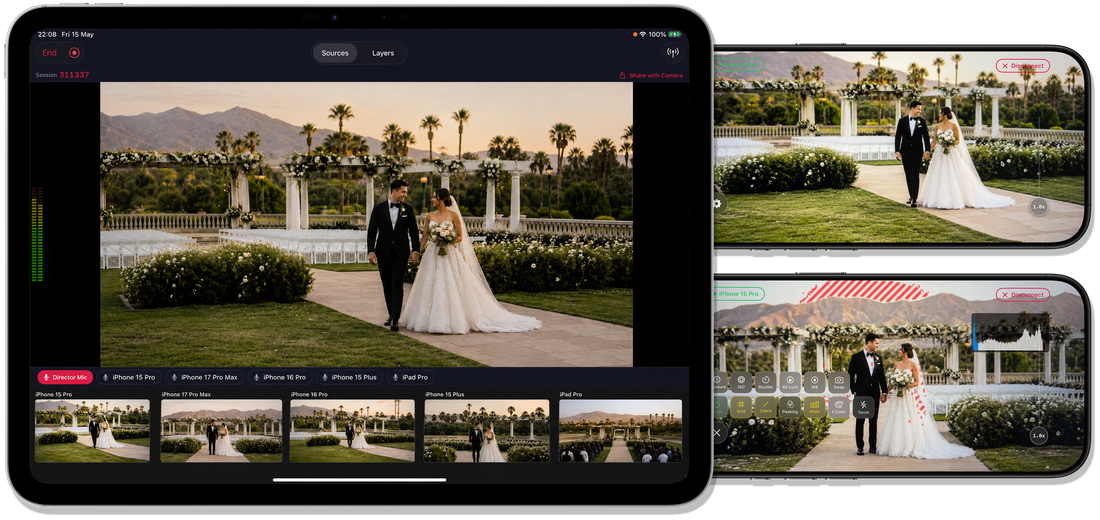
Two Apps. One Studio.
Videk consists of two apps that work together to give you full multi-camera control.

Videk Camera
Install on every device you want to use as a camera source.
- Full manual exposure, ISO, shutter speed & white balance
- Zebra stripes, focus peaking, histogram & false color
- Smooth zoom with automatic lens switching
- 720p, 1080p, or 4K at 24/30/60 fps
- Real-time H.264 hardware encoding

Videk Director
Install on the iPhone, iPad, or Mac you'll use to control everything.
NEW: Native Mac app & Virtual Camera- Native Mac app — with a Virtual Camera for FaceTime, Zoom, Discord & OBS
- Live camera grid with one-tap source switching
- Image & text overlays with drag, scale & rotate
- Record & export sessions with multi-track support
- Archive recordings to iCloud for safe storage
- Export for Final Cut Pro and DaVinci Resolve for pro editing
- Lossless 24-bit audio recording, including USB audio interfaces
- Vertical video support for social-first content
- RTMP streaming to YouTube, Twitch, TikTok & more
Create a session on the Director
Enter the 6-digit code on each Camera
You're live
Professional Camera Control
Every iPhone becomes a broadcast-quality camera with full manual control and professional monitoring tools.
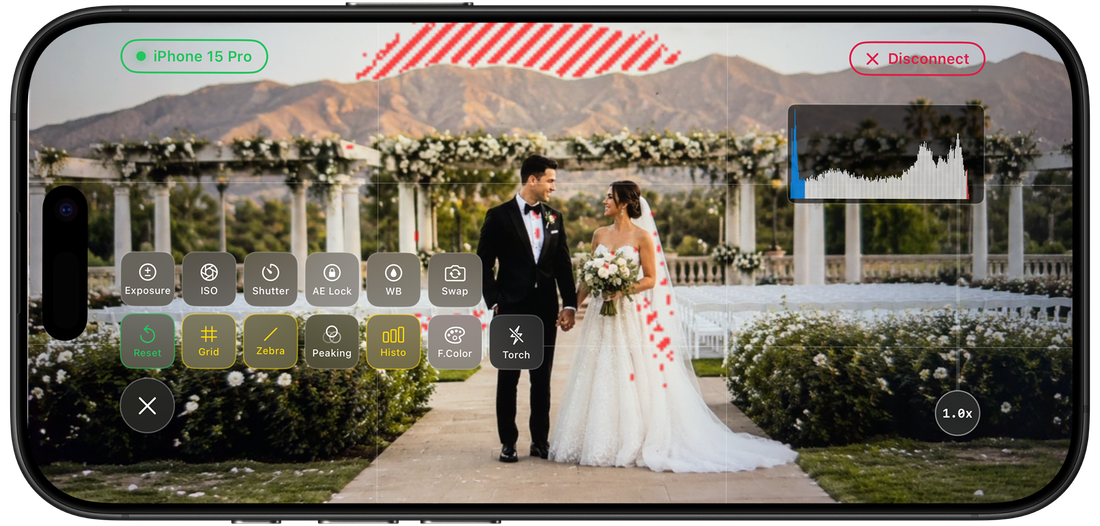
Manual Exposure
Fine-tune exposure, ISO, shutter speed, and white balance (2,000K-8,000K) for complete creative control.
Focus Peaking
Red edge overlay confirms critical focus in real time using Sobel gradient detection. Never miss focus again.
Live Histogram
256-bin luminance histogram with color-coded zones for shadows and highlights. Monitor exposure at a glance.
Zebra & False Color
Zebra stripes flag overexposed areas. False color maps the full luminance spectrum from clipped blacks to clipped highlights.
Lens & Zoom
Smooth zoom slider with automatic switching between ultra-wide, wide, and telephoto. Visual lens markers show which lens is active.
Composition Guides
Rule of thirds grid and frame guides for 16:9, 4:3, 1:1, and 2.35:1 cinema widescreen aspect ratios.
Director: Your Control Room
Your iPhone, iPad, or Mac becomes a full control room — switch cameras, add overlays, record everything, and stream live.
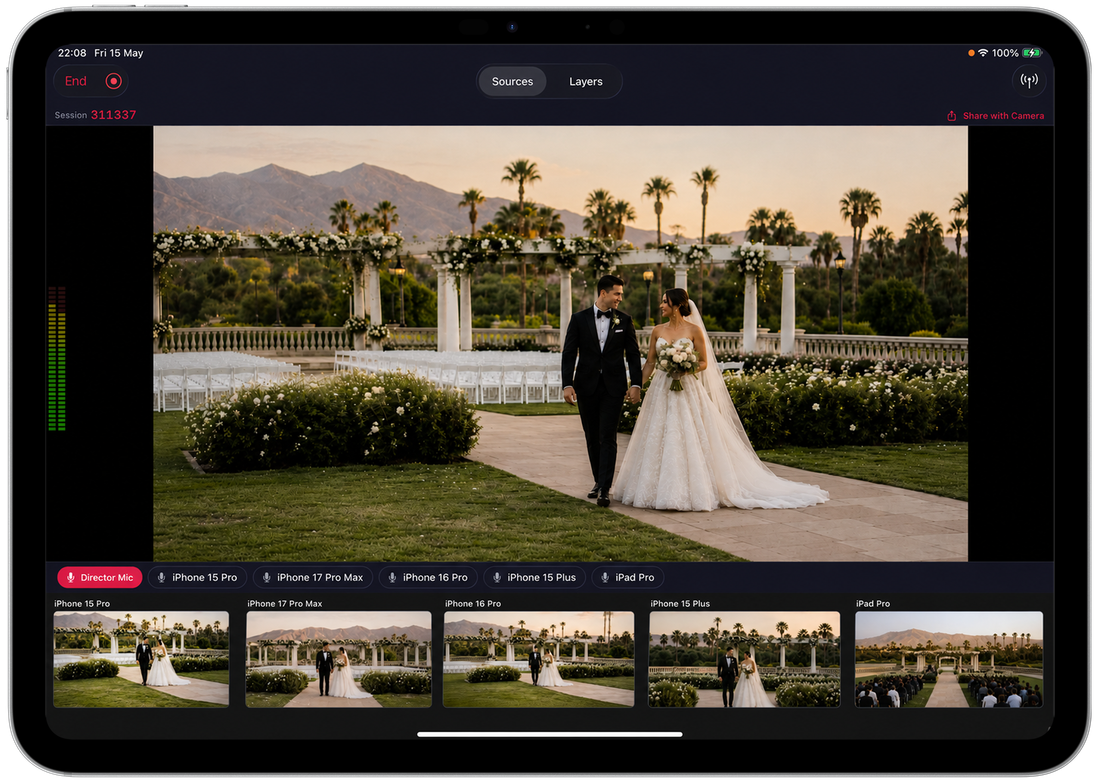
Live Camera Grid
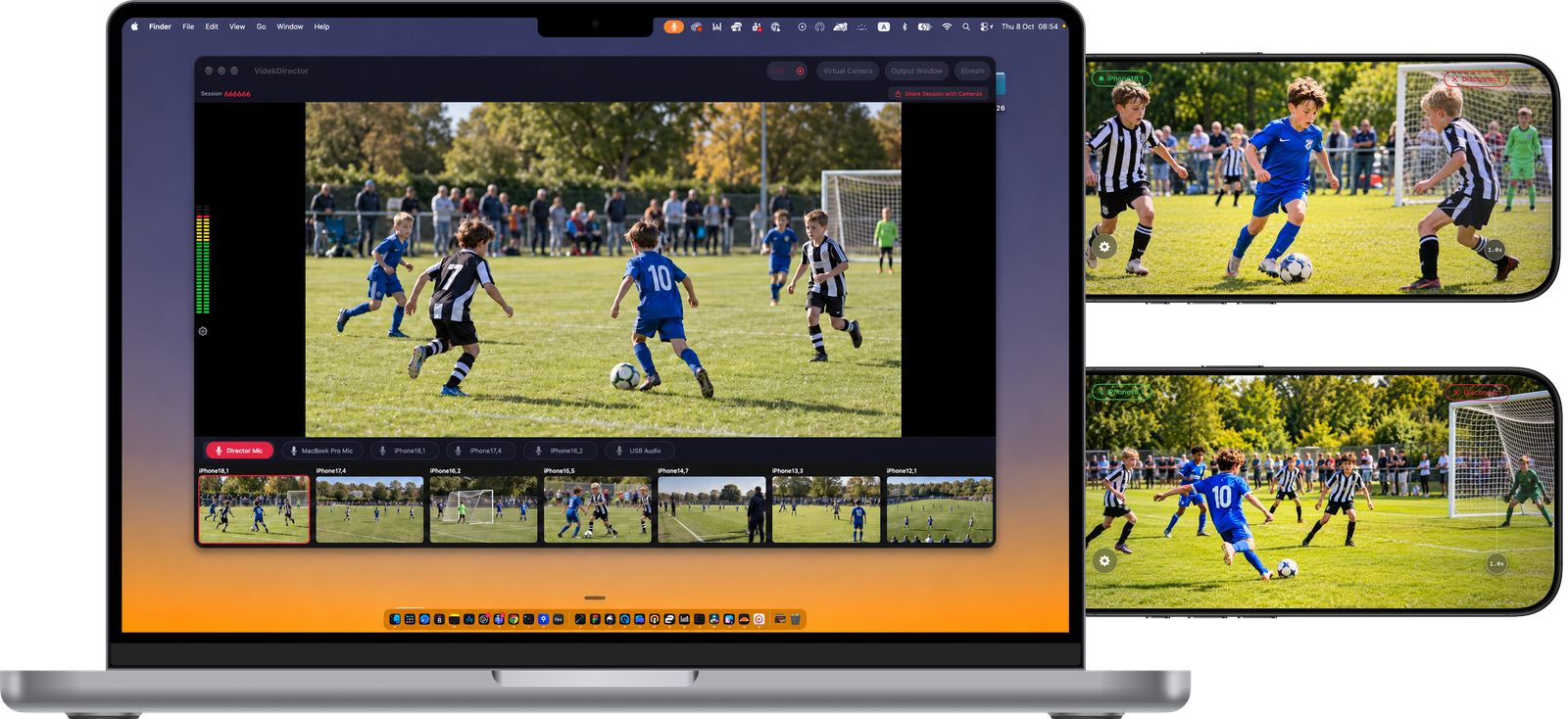
See all connected camera feeds simultaneously. Tap any camera to instantly make it the primary program source.
Live Overlays
Add PNG images, animated GIFs, and custom text on top of your output. Drag, pinch-to-scale, rotate, and adjust opacity.
Web Page Overlays
Drop in any URL — scoreboards, lower-thirds, dashboards, or live HTML graphics — and render it live on top of your stream. Drag, pinch-to-scale, fit-to-canvas, and adjust opacity just like image overlays.
Record Sessions
Record every connected camera simultaneously as individual tracks. Capture your entire multi-camera session with a single tap.
Export Sessions
Export your recorded sessions as finished video files. Re-edit which source is active at any point before exporting the final cut.
iCloud Archive
Archive your recorded sessions to iCloud for safe, long-term storage. Access your recordings from any device, anytime.
Final Cut Pro & DaVinci Resolve Export
Export sessions as an FCPXML project for Final Cut Pro or an XML timeline for DaVinci Resolve, with every camera track included. Jump straight into professional post-production editing.
Lossless Audio Recording
Recorded sessions keep studio-quality sound: a bit-for-bit 24-bit WAV from your selected audio source, including a USB audio interface or mixer plugged into a camera iPhone. Built for musicians.
Virtual Camera (Mac)
Use your live program output as a camera in FaceTime, Zoom, Discord or OBS. Videk Director appears as a system camera on your Mac — a multi-camera show in any call. How it works
Program Output Window
Open a clean, controls-free window with just the program picture (⌘⇧O on Mac) — share it in Discord, send it to an external display or capture it in OBS.
Audio Processing
Compressor, limiter and output level for your live stream, with sensible defaults and full control. Recordings stay untouched and lossless.
Vertical Video
Native 9:16 vertical video support for TikTok, Instagram Reels, and YouTube Shorts. Create social-first content directly.
Video Compositing
GPU-accelerated compositor with single camera, side-by-side, and grid layout modes. Metal-rendered with letterboxing.
RTMP Streaming
Stream directly to YouTube, Twitch, Instagram, and TikTok. H.264 or HEVC encoding, secure RTMPS, and adaptive bitrate, up to 4K.
Color Grading
Real-time contrast and saturation adjustments applied directly to the stream output for a polished, professional look.
Switch Modes
Choose from three automatic switching modes. Auto-Switch analyzes all camera feeds for motion and cuts to the source with the most action. Timed Switch cycles through all cameras at a set interval. Random mode selects unpredictable sources and timing for a dynamic, spontaneous feel.
Sound Level Meter
Real-time sound bar displays incoming audio levels across your sources. Monitor volume at a glance to ensure consistent audio throughout your production.
iMovie Export
Export your multi-camera sessions in a format ready for iMovie. Bring your recordings into iMovie for quick edits, titles, and sharing.
Zero Configuration Networking
Devices discover each other automatically. Your video never leaves your network unless you choose to stream.
Automatic device discovery on your local network
Simple, memorable codes to pair cameras with the director
Purpose-built binary protocol optimized for low-latency video
Everything works over local Wi-Fi. Fully offline capable.
Built For
Live Events
Stream concerts, conferences, and ceremonies with multiple camera angles.
Learn more →Live Music
Film bands and sessions from every angle with lossless audio from your interface.
Learn more →Content Creation
Produce multi-camera YouTube videos, tutorials, and product reviews.
Learn more →Podcasts
Wide, host, and guest angles recorded as separate tracks.
Learn more →Weddings
Capture every moment from multiple perspectives and edit the best angles later.
Learn more →Sports
Switch between wide shots and close-ups in real time during live action.
Learn more →Houses of Worship
Professional-quality multi-camera streaming without professional-quality budgets.
Learn more →Video Calls & Discord
Use several iPhones as one multi-camera webcam on your Mac.
Learn more →Education
Record lectures from multiple angles for later review and distribution.
Learn more →Technical Specifications
| Platforms | iOS 18.6+ · macOS 15.0+ |
| Video Codec | H.264 (hardware accelerated) |
| Max Resolution | 3840 x 2160 (4K) |
| Max Frame Rate | 60 fps |
| Streaming Output | RTMP/RTMPS, H.264 or HEVC, 3–40 Mbps |
| Audio Recording | Lossless 24-bit WAV at the source sample rate (stereo) |
| Recording Format | MP4 (per-source tracks), Final Cut Pro XML, DaVinci Resolve XML |
| Video Orientation | Landscape (16:9) & Vertical (9:16) |
| Cloud Storage | iCloud archive for recorded sessions |
| Network | Bonjour + custom TCP framing |
| Streaming | RTMP to YouTube, Twitch, Instagram, TikTok, custom |
Requirements & Limitations
What Videk needs to run — and what it deliberately does not do.
What you need
- One iPhone, iPad, or Mac running Videk Director (iOS/iPadOS 18.6+, macOS 15.0+)
- One or more iPhones or iPads running Videk Camera (iOS/iPadOS 18.6+)
- All devices on the same local Wi-Fi network — 5 GHz recommended
- About 2–3 Mbps of Wi-Fi bandwidth per camera
- Internet only for RTMP live streaming and iCloud archiving
What Videk doesn't do
- No Android, Windows, or browser version — Videk is Apple-only
- No HDMI, SDI, USB, or NDI inputs — every camera is an iPhone or iPad running Videk Camera
- No remote cameras over the Internet — cameras join over the local network only
- The Director device does not double as a camera
- Free tier covers 2 cameras; unlimited cameras, exports, and iCloud archive are Pro
More detail — including 4K guidance and restricted networks — is in the Videk FAQ. Editing afterwards? See Final Cut Pro export and DaVinci Resolve export. Comparing options? See Videk as a Switcher Studio alternative or multi-camera switching without hardware.
Your Video. Your Network. Your Privacy.
All processing happens on-device. No accounts, no sign-ups, no tracking. Camera streams travel only over your local network.