Multi-Camera Lecture & Classroom Recording with iPhone
Capture lectures, demonstrations, and classroom sessions from multiple angles simultaneously. Record the speaker, the whiteboard, and the room — so students get every perspective when reviewing later.
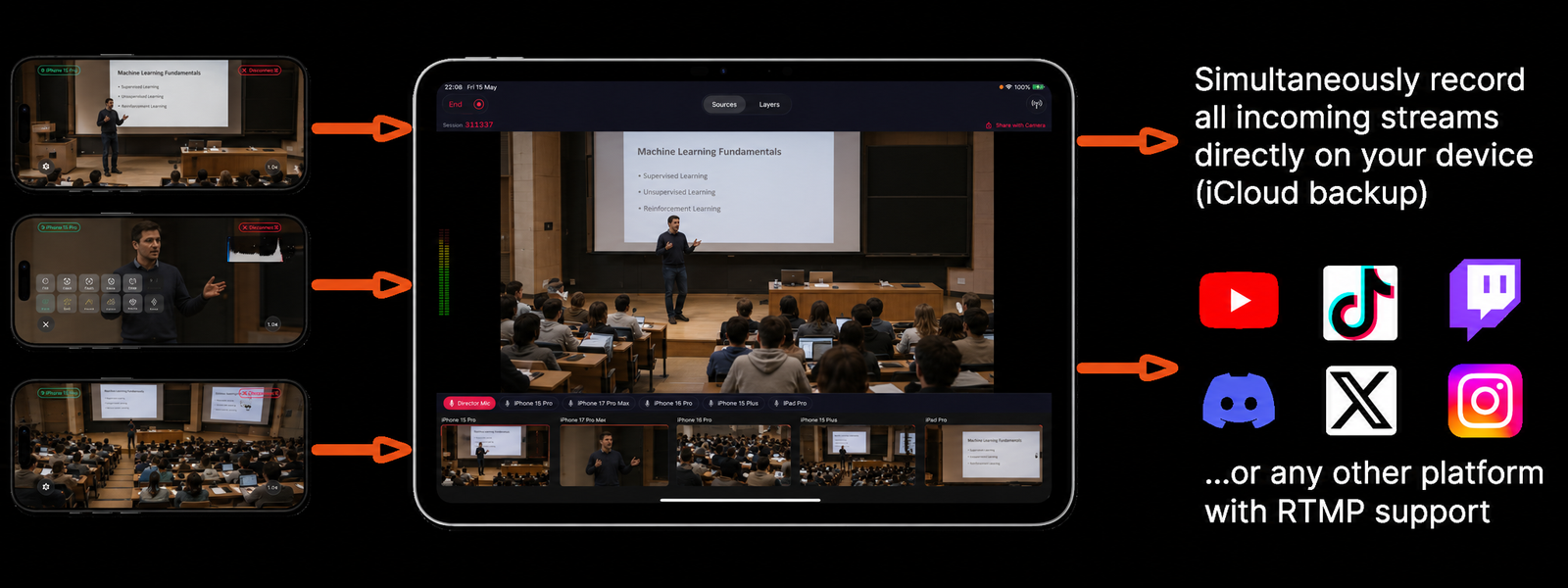
How It Works
Set up a complete multi-angle lecture recording system using iPhones.
- 1Mount iPhones for each angle
Typical setup: one wide shot of the room, one tight on the speaker, one on the whiteboard or screen. Add more cameras for lab demonstrations or practical sessions.
- 2Record everything simultaneously
Hit record in Videk Director and all cameras start capturing in sync. The lecture runs normally — no camera operators needed.
- 3Add chapter markers and overlays
Use text overlays to mark lecture sections, display slide titles, or highlight key points in real time during the recording.
- 4Export and upload to your LMS
Export the edited lecture as a video file for upload to Moodle, Canvas, Google Classroom, or YouTube. iCloud archives every session automatically.
Built for Education
Whiteboard & Speaker Angles
Dedicated camera on the whiteboard or screen means text is legible in 4K even when zoomed out. Students never miss a formula or diagram.
4K Recording
Record at up to 4K resolution so whiteboard text, slides, and demonstrations are sharp and readable during review.
Live Text Overlays
Overlay lecture titles, section headings, or key terms in real time. Helps students navigate the recording by topic later.
iCloud Archive
Every lecture is automatically archived to iCloud. Build a full semester library without manual uploads or storage management.
Any LMS Compatible
Export as a standard MP4 file for upload to any learning management system — Moodle, Canvas, Blackboard, Google Classroom, or YouTube.
No Dedicated Hardware
Uses iPhones already owned by the institution or faculty. No AV system installation, no IT maintenance, no hardware budget.
vs. Lecture Capture Systems
Enterprise lecture capture platforms (Panopto, Kaltura, Echo360) require hardware installation in every classroom, IT maintenance, and ongoing licensing fees that can reach thousands of dollars per year. Videk runs on existing iPhones with no installation, no licensing model beyond the App Store, and captures better multi-angle video than fixed-angle lecture capture hardware.
Start Your First Session
Download free. No sign-up. No hardware. Just iPhones and Wi-Fi.