Stream from iPhone to YouTube with Multiple Cameras
Go live on YouTube from multiple iPhones at once. Videk handles multi-camera switching and sends a single RTMP stream to YouTube Live — no encoder, no laptop, no OBS required.
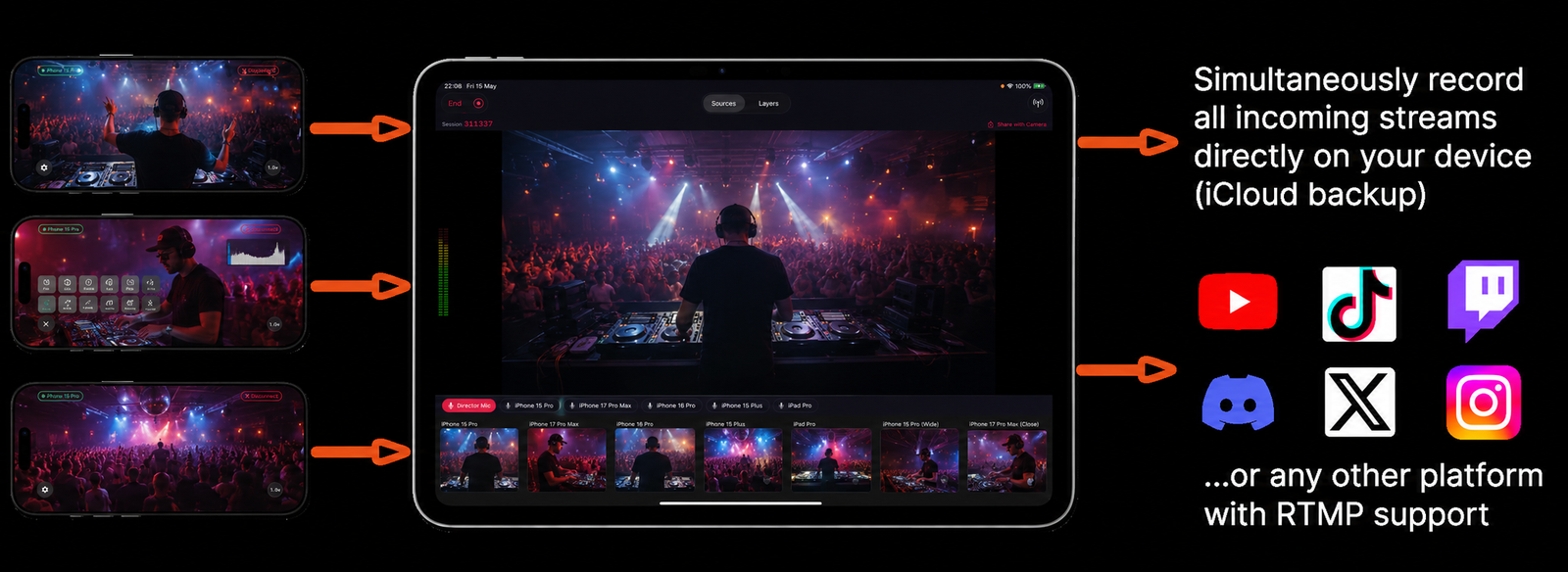
How It Works
From zero to live on YouTube in under 5 minutes.
- 1Get your YouTube RTMP credentials
In YouTube Studio, go to Go Live → Stream → copy the Stream URL (rtmp://a.rtmp.youtube.com/live2) and your Stream Key.
- 2Enter the stream URL in Videk Director
Open Videk Director → Stream Settings → paste the YouTube RTMP URL and Stream Key. Videk remembers these for future sessions.
- 3Connect your iPhone cameras
Open Videk Camera on each iPhone you want to use. They appear automatically in Videk Director as camera sources.
- 4Tap Start Stream
Videk mixes your cameras, switches between them based on your input, and sends a single H.264 RTMP stream to YouTube — all from your iPhone or iPad.
Built for RTMP Streaming
No Encoder Required
Videk does all the video mixing and encoding on-device. No OBS, no laptop, no capture card. Everything runs on iPhone or iPad.
Multi-Camera Switching
Switch between up to unlimited camera angles live on the stream. Transitions include cut, fade, dissolve, push, and wipe.
YouTube, Twitch, TikTok & More
Any RTMP destination works — YouTube Live, Twitch, Instagram Live, TikTok LIVE, Facebook Live, or a custom RTMP server.
Director Mic Audio
Use the Director device's microphone as the primary audio source, or switch audio between camera sources during the stream.
Live Overlays
Add text titles, lower thirds, and image overlays that appear on the YouTube stream in real time — no separate graphics software.
YouTube-Ready Encoding
Constant bitrate within YouTube's recommended range for each resolution, a 2-second keyframe interval, secure RTMPS, and optional adaptive bitrate when your upload dips.
vs. OBS + Capture Cards
The traditional multi-camera YouTube live stream setup requires OBS Studio running on a laptop, one or more capture cards ($100–$500 each), HDMI cables, and cameras with clean HDMI output. Total cost: $500–$2,000+, plus the complexity of OBS configuration. Videk does the same job with iPhones over Wi-Fi — no laptop, no cables, no capture hardware, no OBS.
Start Your First Session
Download free. No sign-up. No hardware. Just iPhones and Wi-Fi.